
Pregnancy and Due Date Tracker
WachangaParenting
4.5638.00 Reviews
- Version
- 4.14.0
- Installs
- 10.00M
- Age Rating
- Everyone
Screenshots



Our Review of Pregnancy and Due Date Tracker
 Analysis by Appyee
When pregnancy dates start to blur together, a tracker can make the next step easier to see. I like the idea of keeping a due-date estimate, weekly context, and practical timing tools in one place, as long as the app stays a companion rather than a substitute for medical advice. Pregnancy and Due Date Tracker is a free parenting app from Wachanga, and its focus is following pregnancy from an estimated starting point through the weeks ahead.
What I look for before relying on a pregnancy app
Pregnancy information is personal, so I would judge any app on more than how polished its screens seem. I want to know what information I am asked to enter, which choices are visible, and whether I can use the features that matter without feeling pressured to share more than I intend. I would also treat medical guidance carefully: an app can help me organize questions and notice patterns, but it cannot assess symptoms or replace a clinician who knows my pregnancy.
The app has an average rating of 4.5 from around 206,000 ratings, and it has been installed over 10 million times. Those figures suggest that many people have tried it, but popularity alone is not proof that every feature suits every family. I would use other parents’ experiences as context, not as a reason to treat community discussion or in-app advice as individualized care.
Making the date estimate useful
The starting point is straightforward: enter a due date or the first day of your last period, then use the resulting timeline as a planning reference. If you already have a date from a clinician, it is worth checking that the app is using the same one. If you are unsure which date to enter, or your cycles make a last-period estimate hard to interpret, I would ask a healthcare professional rather than repeatedly changing the inputs until the result feels reassuring.
A useful habit is to note the date and source you are working from in your own appointment notes. That small step helps prevent confusion if an estimate changes after a clinical scan or conversation. A due date is a guide for tracking weeks, not a promise about when labor will begin, so I would avoid making rigid plans around the countdown alone.
Using the tools without handing over your judgment
I’d use this section to keep the app’s practical role clear: it can help organize dates and observations, while decisions about symptoms and care remain yours and your clinician’s. That distinction matters most when a timer or weekly update feels persuasive; next, I’d look at the visible choices that shape how you use the app.
Keeping the week-by-week view in perspective
The week-by-week material gives the timeline some shape, with growth comparisons and explanations of changes that may happen during pregnancy. I find that kind of overview most helpful when I read it as general background and then bring any personal concern to an appointment. Pregnancy varies, and a familiar comparison or symptom description should not make anyone feel that their body has to match an app’s schedule exactly.
For a practical routine, I would choose one quiet moment each week to check the update, write down questions, and leave the app until the next time it is useful. That avoids turning every new symptom or passing worry into an invitation to search for an answer. If reading the content increases anxiety, it is reasonable to skip a section or take a break; more information is not always more comforting.
Timing kicks and contractions with care
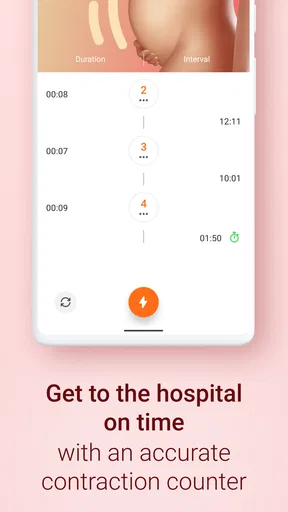
The kick counter and contraction timer are the tools most likely to matter in a specific moment, but they serve different purposes. A counter can help you keep a record when you have been asked to pay attention to movement; a timer can help you note the spacing and duration of contractions. Before relying on either, I would ask my care team what they want me to track and when a change should prompt a call. The app can make recording easier, but it cannot decide whether a pattern is safe.
A small workflow tip: if you are tracking contractions, start timing when you can do so calmly, and keep the record available to describe to your clinician or birth team. During a stressful moment, trying to navigate several screens can become its own distraction. If symptoms feel urgent or you have been given specific instructions, follow those instructions rather than waiting for an app timer to reach a threshold.
Community advice and personal boundaries
The original appeal of a parent community is easy to understand: other people may describe questions you had not thought to ask, or share how they handled an ordinary challenge. I would use those conversations to gather discussion points, not to diagnose myself or compare my pregnancy with someone else’s. A reassuring story cannot establish that another person’s situation is the same as yours, and a frightening story is not a prediction of what will happen to you.
When a topic feels sensitive, I would pause before posting identifying details or information I would not want repeated outside the conversation. I would also be selective about notifications and discussion threads if they interrupt rest or make worries harder to put down. The best community experience is one that leaves you better prepared to talk with a professional, not one that makes peer opinion feel like a replacement for care.
Small planning habits that make the app more useful
A tracker works best when it supports a routine you already need. I would keep appointment questions in one place, note patterns only when they are useful to discuss, and use reminders sparingly so they do not become another stream of alerts to manage. If you are sharing pregnancy planning with a partner, a simple weekly check-in can turn the date view into a conversation about transport, work arrangements, or what you want to ask at the next visit.
One realistic example is a busy weekday when you notice a change and have an appointment later in the week. Rather than trying to interpret it through search results, you can make a brief note of what happened and when, then bring that note to the appointment. For a time-sensitive concern, though, waiting for that appointment may not be appropriate; contact your care team using the guidance they have given you.
What it costs and who may prefer another option
The app is free to download, with in-app purchases ranging from $0.99 to $89.99 per item. I would check the purchase screen carefully before starting anything paid and decide whether the free experience already covers what I need. A pregnancy tracker can feel especially useful when several tools sit together, but convenience is not a reason to buy features you will not use or to treat paid material as more medically authoritative.
It is rated for Everyone, was released on August 16, 2016, and its current version is 3.152.1, with Android 9 as the minimum operating-system requirement. The broad age rating makes it suitable for general audiences, but parents should still make their own choices about what pregnancy content is appropriate for a child to see. I would also keep the app updated through the platform I use and review the choices presented during setup rather than assuming that every setting matches my preferences.
Compared with a simple calendar, this app brings pregnancy-specific tracking tools into the same experience, which can save switching between separate timers and date calculations. A calendar may still be better if you only want to record appointments and prefer not to read weekly content. A clinician’s portal or advice from your care team is the better source for personal medical decisions, while a paper notebook may suit someone who wants a private, low-distraction record without a community or extra app features.
A Friendly Interface
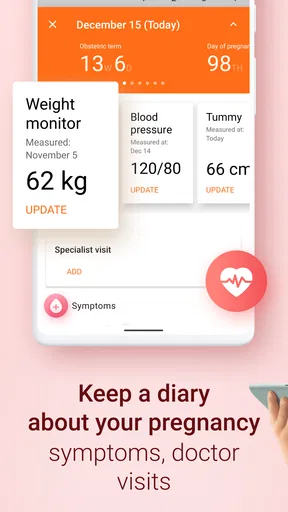
The interface of the Pregnancy and Due Date Tracker is incredibly user-friendly. It’s designed with a simple yet elegant layout, making navigation a breeze. Everything you need is right at your fingertips. There are sections for each trimester, a weekly update feature, and even a countdown to the big day! It’s like having a little pregnancy cheerleader, giving you updates and encouragement along the way.
Features that Make a Difference
One of the standout features is the weekly updates. Each week, you get to see how your baby is growing, with adorable fruit and vegetable comparisons to give you a size reference. Also, it includes tips on what to expect, both emotionally and physically. I found the insights about what’s happening in my body to be incredibly reassuring.
Moreover, the app comes with a kick counter and contraction timer, which are absolute lifesavers in the later stages of pregnancy. Trust me, when you’re feeling those kicks or wondering if it’s time to head to the hospital, these tools are invaluable.
Community and Support
What really blew me away was the community aspect of the app. There’s a vibrant forum where you can connect with other parents-to-be, share experiences, and ask questions. It’s like having a group of friends who are all going through the same journey as you. I’ve spent countless hours reading through discussions and picking up tips that I hadn’t even considered before.
Personalization and More
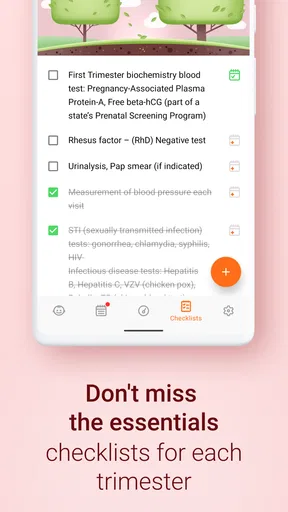
The app allows for a high degree of personalization. You can set reminders for doctor’s appointments, prenatal classes, and even jot down notes about how you’re feeling. I found this feature particularly handy for tracking my mood swings and cravings, which made for some fun memories to look back on.
Additionally, there are sections dedicated to nutrition and exercise, offering advice tailored to your trimester. Keeping healthy during pregnancy is crucial, and the app provides gentle nudges to help you stay on track.
Wrapping It Up
In conclusion, the Pregnancy and Due Date Tracker is an essential tool for anyone navigating the ups and downs of pregnancy. It’s comprehensive, easy to use, and packed full of features that genuinely make a difference. Whether it’s your first pregnancy or your fifth, this app offers a wealth of information and support.
So, if you’re looking for a companion through your pregnancy journey, I wholeheartedly recommend giving the Pregnancy and Due Date Tracker a try. It’s like having a little slice of peace of mind in the palm of your hand. Happy parenting!
Privacy and Permissions
See what permissions an app requests and how it handles your data.
- Phone
- read phone status and identity
- Wi-Fi connection information
- view Wi-Fi connections
- Device ID & call information
- read phone status and identity
- Other
- view network connections, pair with Bluetooth devices, change network connectivity, full network access, run at startup, control vibration, prevent device from sleeping, read Google service configuration
Verdict
Strengths of Pregnancy and Due Date Tracker
- Intuitive and user-friendly interface.
- Comprehensive week-by-week guides.
- Customizable reminders for appointments.
- Integration with health tracking apps.
- Access to expert advice and articles.
Limitations of Pregnancy and Due Date Tracker
- Limited features in the free version.
- Occasional ads can disrupt usage.
- Requires internet for full functionality.
- Some users report minor bugs.
- Privacy concerns about data sharing.
Similar Picks in This Category
View All
Family Space
Motorola Mobility LLC.3.9

شرطة الأطفال - مكالمة وهمية
Oub Apps4.1

Findmykids: Parental Control
LETEM LTD4.6

Pregnancy + | Tracker App
Philips Electronics UK Limited4.8

Policía de niños - para padres
Kids police4.7

Pregnancy App
Amila4.9
Frequently Asked Questions
What features does the Pregnancy and Due Date Tracker app offer?
The Pregnancy and Due Date Tracker app provides a range of features to support expectant parents, including a personalized pregnancy tracker, weekly updates on fetal development, a due date calculator, and tips for each trimester. Additionally, it offers a community forum for connecting with other parents and access to expert advice on pregnancy-related topics.
Is the Pregnancy and Due Date Tracker app user-friendly for first-time parents?
Yes, the app is designed with first-time parents in mind, offering an intuitive interface that's easy to navigate. It provides step-by-step guidance for each stage of pregnancy, ensuring that users can easily track their progress, access important information, and find support when needed. The app's layout is straightforward, making it accessible even for those new to using such applications.
Can I customize notifications in the Pregnancy and Due Date Tracker app?
Absolutely, the app allows users to customize notifications based on their preferences. You can set reminders for prenatal appointments, track daily health logs, and receive timely advice on important milestones. This flexibility ensures that you receive the information you need at the right time, without overwhelming you with unnecessary alerts.
Does the Pregnancy and Due Date Tracker app offer privacy for my personal data?
Yes, the app prioritizes user privacy and employs robust security measures to protect your personal data. It complies with relevant privacy regulations and provides users with control over their data, allowing you to manage your privacy settings, decide what information to share, and ensure your data is securely stored.
Is the Pregnancy and Due Date Tracker app compatible with both Android and iOS devices?
The app is fully compatible with both Android and iOS devices, ensuring that users across different platforms can access its features seamlessly. Regular updates are provided to maintain compatibility with the latest operating system versions, and the app is optimized for both smartphones and tablets to enhance user experience.
